

精通
英语
和
开源
,
擅长
开发
与
培训
,
胸怀四海
第一信赖
精通
英语
和
开源
,
擅长
开发
与
培训
,
胸怀四海
第一信赖
锐英源精品开源心得,转载请注明:“锐英源www.wisestudy.cn,孙老师作品,电话13803810136。”需要全文内容也请联系孙老师。
GSoap生成的代码很复杂,虽然我以前用过动软生成过C#三层代码,虽然是三层,也比GSoap简单,为了帮助大家更好理解,这里对一篇英文文章进行翻译。 本文说的存根代码,也就是工具生成的源代码,我曾经定制升级过。
Sometimes in our daily lives as developers we have to integrate technology with different qualities sometimes this products are expensive or some relative close to the business lines, for example how to use a enterprise service overall the communication with legacy systems that is tough question, so the first possibility to resolve this problem is using message queue or web service or any other component there are many ways but the result should be measured and quantifiable for getting an approximation.有时在我们的日常生活中,作为开发人员,我们必须集成具有不同层级的技术,有时这些产品很昂贵或者相对接近业务线,例如如何使用企业服务整体与传统系统进行通信这是一个棘手的问题,所以解决此问题的第一种可能性是使用消息队列或Web服务或任何其他组件有很多方法,但结果应该被评估和量化以获得大概认识。。
I want to emphasize a scenario where you are using a HP-UX server you want to integrate a legacy business process with enterprise service bus, so typically you have an interface from your ESB that could be a WSDL, this legacy system can execute a library, by now the common solution is doing some message queue put a message and wait that MDB get the message and you will be waiting the response, by this way is a very fast solution but if you want to use XML on web service scenario well one advantage of ESB is that you could do eventually with the broker a transformation where you put a XML message in queue and the ESB literally will do the transformation this is a nice solution but I can give another one 'webservice vs. legacy program' instance you should be thinking use a language like C (ANSI) or Python or cURL.我想强调一种情况,即您正在使用要将正规业务流程与企业服务总线集成的HP-UX服务器,因此通常您的ESB接口可以是WSDL,此正规系统可以执行库,现在通常的解决方案是做一些消息队列发送消息并等待MDB获取消息,你将等待响应,通过这种方式是一个非常快速的解决方案,但如果你想在Web服务方案上使用XML,一个ESB的优点在于,您最终可以在代理中进行转换,将XML消息放入队列中,ESB实际上将进行转换,这是一个很好的解决方案,但我可以给另一个“webservice vs.正规程序”实例,你应该考虑使用像C(ANSI)或Python或cURL这样的语言。
If you have using web service client generator like axis2 or wsdl.exe you should be familiarized with this toolkit is called GSoap is really fast and reliable in many aspects, if you search on internet you will get something like:如果您使用了像axis2或wsdl.exe这样的Web服务客户端生成器,那么您应该熟悉这个名为GSoap的工具包,它在很多方面都非常快速可靠,如果您在互联网上搜索,您将获得如下内容:
"gSOAP is an open source C and C++ software development toolkit for SOAP/XML Web services and generic XML data bindings. ", Wikipedia “ gSOAP是一个用于SOAP / XML Web服务和通用XML数据绑定的开源C和C ++软件开发工具包。”,Wikipedia
The interesting part of the toolkit is that you will get C ANSI code generated on your stub, essentially all GCC compilers will translate his code<code> 该工具包的有趣的部分是,你会得到你的存根生成的C ANSI代码,基本上所有GCC编译器将能编译。
代码用法
1. Download GSOAP Toolkit
The first step is download GSoap Toolkit from following site: http://sourceforge.net/projects/gsoap2/files/
Second Step should be install GSoap Toolkit , unzip gsoap_2.7.15.tar in a root directory for execution.
Example: C:/SOAP/ gsoap_2.7.15
There are two executable files that allow us to generate libraries for connecting to the Web Service:
第一步是从以下站点下载GSoap Toolkit:http://sourceforge.net/projects/gsoap2/files/
第二步应该是安装GSoap Toolkit,在根目录中解压缩gsoap_2.7.15.tar以便执行。
示例:C:/ SOAP / gsoap_2.7.15
有两个可执行文件允许我们生成用于连接Web Service的库:
a.1 Run wsdl2h.exe 运行wsdl2h.exe
 wsdl2h -c -o Archivo.h http://127.0.0.1:8088/WebService01/services/Enviar?wsdl
     -c Compilation in C
-o Output File Reference Archivo.h
     Generation Archivo.h library interface
     http://127.0.0.1:8088/WebService01/services/Enviar?wsdl Web Service
a.2 Run soapcpp2.exe 运行soapcpp2.exe
soapcpp2-c-C-L Archivo.h
   -c Compilation in C
      Customer-C Files    -L
    Generation Archivo.h library interface
2. Get WSDL file from Web Service Endpoint
Here is an WSDL Example that you can see the xml structure.这是一个WSDL示例,您可以看到xml结构。
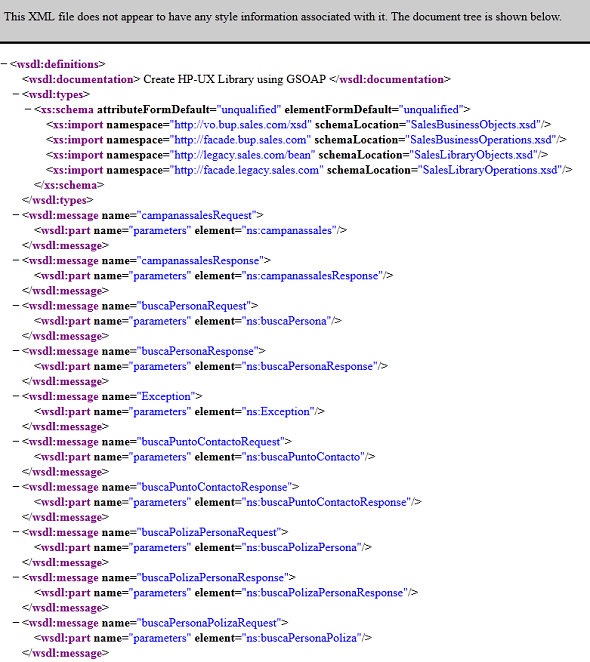 |
GSoap can process the WSDL from the Web Service Endpoint only if the sitio does not have any kind of authetication that prevent direct access to web service. The most recommended option is directly get wsdl file from a web browser, taking care downloading the xsd files and change it form schemaLocation tag.仅当sitio没有任何阻止直接访问Web服务的身份验证时,GSoap才能从Web服务端点处理WSDL。最推荐的选项是直接从Web浏览器获取wsdl文件,注意下载xsd文件并将其更改为表单 schemaLocation标记。
3. Generate Header File for the Stub
Generate the Header File 'SaleService.wsdl' thats has the necessary structures and procedures to generate the stub, it is important to note that the file will guide us to implement a web service client.生成头文件'SaleService.wsdl',它具有生成存根的必要结构和过程,重要的是要注意该文件将指导我们实现Web服务客户端。
Example:
C:\SOAP\gsoap_2.7.15\gsoap\bin\win32>wsdl2h -c -o SalesService.h D:\CODE\wsdl\sales\SalesService.wsdl

**  The gSOAP WSDL/Schema processor for C and C++, wsdl2h release 1.2.15
**  Copyright (C) 2000-2009 Robert van Engelen, Genivia Inc.
**  All Rights Reserved. This product is provided "as is", without any warranty.

**  The wsdl2h tool is released under one of the following two licenses:
**  GPL or the commercial license by Genivia Inc. Use option -l for more info.

Saving SalesService.h

Cannot open file 'typemap.dat'
Problem reading type map file 'typemap.dat'.
Using internal type definitions for C instead.

Reading file 'D:\CODE\wsdl\sales\SalesService.wsdl'... done reading 'D:\CODE\wsdl\sales\SalesService.wsdl'

To complete the process, compile with:
soapcpp2 SalesService.h
If we open the file containing struct SalesService.h notice that they are related to the input parameters and return variables.如果我们打开包含struct SalesService.h的文件,请注意它们与输入参数和返回变量有关。
Example:
struct _ns1__ejecutarServicio  {
      char*  tipoServicio   0;
      char*  parametro    0;
  };
Another important point is that we handle struct for C (ANSI), if we had used the-c parameter in wsdlh.exe, would have generated code in C + +, and this does not benefit us in the HP-UX terminals. 另一个重点是我们处理C(ANSI)的结构,如果我们在wsdlh.exe中使用了-c参数,则会在C ++中生成代码,这对HP-UX终端没有好处。
4. Generate the Stub
With SalesService.h header file we can use the following executable: 使用SalesService.h头文件,我们可以使用以下可执行文件:
C:\SOAP\gsoap_2.7.15\gsoap\bin\win32>soapcpp2 -c -C -L SalesService.h

**  The gSOAP code generator for C and C++, soapcpp2 release 2.7.15
**  Copyright (C) 2000-2009, Robert van Engelen, Genivia Inc.
**  All Rights Reserved. This product is provided "as is", without any warranty.

**  The soapcpp2 tool is released under one of the following three licenses:
**  GPL, the gSOAP public license, or the commercial license by Genivia Inc.

Saving soapStub.h annotated copy of the input definitions
Saving soapH.h serializers
Saving soapC.c serializers
Saving soapClient.c client calling stubs
Using ns3 service name: SaleServiceSoap11Binding
Using ns3 service style: document
Using ns3 service encoding: literal
Using ns3 service location: http://127.0.0.1:80/SalesService/services/SalesServiceHttpSoap11Endpoint/
Using ns3 schema namespace: http://sales.com/SalesServiceSoap11Binding

....

Compilation successful
If we observe the command line, are generated 4 files extension *.c如果我们观察命令行,则生成4个文件扩展名* .c
生成的文件需要以下内容:
Files Generated need the following:
Archivo |
Definición |
|
1. |
soapH.h |
Main Header File. 主头文件。 |
2. |
soapC.c |
File with Data Structures.带有数据结构的文件。 |
3. |
soapClient.c |
File with the implementation of the methods in C Web Service. 文件与C Web Service中的方法的实现 |
4. |
SalesService Soap12Binding.nsmap SalesServiceSoap11Binding.nsmap |
Struct with corresponding namespaces Soap versions 1.1 and 1.2, this according to the version you wish to use. 具有相应命名空间的Soap Soap版本1.1和1.2,根据您要使用的版本。 |
5. Header file for the library
We continue to write the library in first generating Header File (SalesServiceWS.h).我们继续在第一个生成头文件(SalesServiceWS.h)中编写库。
#if defined(__cplusplus)
    extern "C" {
#endif
#ifdef WIN32
    __declspec( dllexport )
#endif
void ejecutarServicio(char *endpoint, char *usuario, char *contrasenya,
char *tipoServicio, char *parametro, char *respuesta, char *error, char *llave);
#if defined(__cplusplus)
#endif
This file contains the public firm library SL / DLL. 此文件包含公共公司库SL / DLL。
6. Main file with the implementation of the library
We continue to write the call to the Web Service method according to this signature on file SaleService.h:
我们继续根据文件SaleService.h上的这个签名编写对Web Service方法的调用:
… #include "soapH.h" // Archivo cabecera con las variables y procedimientos para enviar y recibir mensajes SOAP #include "SalesServiceWS.h" // Archivo cabecera con el procedimiento de la libreria SL/DLL #include//No se empleo SalesServiceSoap12Binding.nsmap directamente para descartar problemas de lectura del tipo del archivo /** * Namespace Web Service * Mapa Obtenido del Archivo SalesServiceSoap12Binding.nsmap * Se elige la version 1.2 para resolver la implementacion sobre la plataform NET 3.5 / WIN32 */ struct Namespace namespaces[] = { //Namespaces autogenerados del WSDL … }; /* …. */ void ejecutarServicio(char *endpoint, char *usuario, char *contrasenya,char *tipoServicio,char *parametro, char *respuesta, char *error) { const char *mensaje=""; //variable temporal para almacenar mensajes //VERIFICANDO SI ENDPOINT NO ES NULO O SI NO ESTA VACIO if(!endpoint || strlen(endpoint)==0){ ... } //VERIFICANDO SI USUARIO Y/O CONTRASENYA NO ES NULO O SI NO ESTAN VACIOS if(!(usuario&&contrasenya)|| strlen(usuario)==0|| strlen(contrasenya)==0){ ... } //VERIFICANDO SI TIPO DE SERVICIO Y/O PARAMETRO DE SERVICIO NO ES NULO O SI NO ESTAN VACIOS if(!tipoServicio||!parametro|| strlen(tipoServicio)==0|| strlen(parametro)==0){ ... } struct soap msoap; soap_init (&msoap); //inicializar el contexto del mensaje soap msoap.userid = usuario; //usuario para http-basic autenticacion msoap.passwd = contrasenya; //contrasenia para http-basic autenticacion msoap.send_timeout = 1500; msoap.recv_timeout = 1500; soap_set_namespaces(&msoap, namespaces); // cargando namespaces en el mensaje soap //verificar si el servicio web esta activo if ( soap_connect_command(&msoap, SOAP_GET, endpoint,"") || soap_end_send(&msoap) ) { //abrimos y cerramos una conexión temporal ... } struct _ns1__ejecutarServicio inputMensaje; // struct mensaje SOAP de entrada struct _ns1__ejecutarServicioResponse responseMensaje; // struct mensaje SOAP de respuesta inputMensaje.tipoServicio = tipoServicio; inputMensaje.parametro = parametro; int temporal_respuesta=-1; // valor obtenido del procedimiento del mensaje soap /* * Procedimiento declarado en soapClient.cpp * @param (1) msoap; mensaje SOAP inicializado para el envio del mensaje * @param (2) endpoint: URL del Servicio Web * @param (3) action: Accion a tomar en el Servicio Web * @param (4) inputMensaje: SOAP struct entrada * @param (5) responseMensaje: SOAP struct respuesta */ temporal_respuesta=soap_call___ns4__ejecutarServicio(&msoap, endpoint, 0, &inputMensaje, &responseMensaje); if(!msoap.status){ ... } //Variable SOAP_OK, se localiza en el archivo strsoap2.h //Evalua que el mensaje llego correctamente if(temporal_respuesta==SOAP_OK) { if(!responseMensaje.return_){ //SI EL MENSAJE ES NULO LA RESPUESTA ES UN MENSAJE VACIO ... }else{ //Respuesta recibida exitosamente ... } error=NULL; }else if(temporal_respuesta==12){ // Consultar archivo stdsoap2.h para obtener mas detalle del error obtenido ... }else if(temporal_respuesta==404){ ... }else if(temporal_respuesta==401){ ... }else{ ... } soap_end(&msoap); soap_done(&msoap); soap_free(&msoap); //liberar recursos del mensaje SOAP }
7. Compilation Shell
The next thing is to compile the component on a HP-UX Terminal, so we need to ask the following fact:
When HP-UX compile our programs must be generated in 64bit for other programs running on the server can open the library and their corresponding links,
as is the case for Progress Program 9, the common misconception regarding compilation this program is on the library dld.sl.
Finally this is shell you could run on HP-UX Terminal, the reason is to compile all your source and get a library with *.sl extension.
接下来要在HP-UX终端上编译组件,因此我们需要问以下事实:
当HP-UX编译时,我们的程序必须以64位生成,因为服务器上运行的其他程序可以打开库及其相应的链接,以防范进度程序9,关于编译此程序的常见误解是在库dld.sl上。
最后,这是您可以在HP-UX终端上运行的shell,原因是编译所有源并获得扩展名为* .sl的库。
#!/bin/sh
#******************************************************************************
#* Archivo:      compilarSalesServiceLib.sh                                   *
#*                                                                            *
#* Autor:        Sanchez Huerta Octavio
#* F. Creación:  17/may/2010                                                  *
#* Plataforma:   HP-UX 11.1                                                   *
#******************************************************************************
#*                                                                            *
#* Shell de compilacion para la SalesService                                  *
#*                                                                            *
#*****************************************************************************/

echo 0 Proceso Inicio
date #Mostrando Fecha de Inicio
echo 1 Asignando Permisos
#Permisos para compilar los archivos
chmod 755 *

echo 2 SalesServiceLIB CONFIGURANDO
#Renombrando archivos de compilacion, por cambio de nombre al momento de la tranferencia
mv soapc.c soapC.c
mv soaph.h soapH.h
mv soapstub.h soapStub.h
mv wsbup.h WSBup.h
mv wsbupmain.c WSBupMain.c
echo 3 SalesService LIB BORRANDO ARCHIVO O Y SL
#removiendo archivos objecto y librerias sl en caso anteriores
rm -f *.o
rm -f *.sl

echo PASO 4 SALESSERVICELIB COMPILANDO WS SALES
#IMPORTANTE(!): Compilacion en 64bits, flag de nonamespaces debido a que no empleamos el archivo *.nsmap
cc +z +DD64 -c -DWITH_NONAMESPACES WSBupLib.c soapC.c soapClient.c stdsoap2.c

echo PASO 5 SALESSERVICELIB COMPILANDO LIBRERIA
#Cargando Librerias OpenSSL a la libreria
cc -b -o libSalesServiceHTTP.sl SalesServiceLib.o soapC.o
   soapClient.o stdsoap2.o -I/usr/lib/pa20_64 -L/usr/lib/pa20_64 -lxnet -lnsl -ldl -lpthread

echo PASO 6 SALESSERVICELIB GENERANDO PROGRAMA PRUEBA
#Programa de prueba
cc +DD64 -o SalesServiceMain SalesServiceMain.c -L. -libSalesServiceHTTP

echo PASO 7 SALESSERVICELIB REMOVIENDO ARCHIVOS OBJETO
rm -f *.o

echo PASO 8 FINALIZO
date #Mostrando Fecha de Fin
An important point during compilation is to include operating system libraries needed for compilation as in the case of lxnet, lnsl, ldl, lpthread.
编译期间的一个重点是包括编译所需的操作系统库,如lxnet,lnsl,ldl,lpthread。